 Itemlume
DIAGNOSTIC GUIDE / Product videos
Why does my YouTube Short play on YouTube but fail when I add it to Shopify?
Check the URL form and viewing permissions before re-exporting the video. Shopify’s reviewed guidance calls for a standard YouTube watch URL when adding media from URL and distinguishes that from a Shorts page address. A video that plays for its owner may still be unavailable for the intended embedding route. Check the address and access route before treating the host’s rejection as creative failure.
A Shorts link is not the documented product embed route
Video identity, page address and access permission are separate checks. Changing the address form should retain the same video ID, not point at another upload. Public or unlisted viewing and embedding restrictions matter independently from whether YouTube classifies the clip as a Short.
The reviewed Shopify media page documents a normal YouTube watch address and distinguishes it from a Shorts address. Treat that as a route-specific requirement, not proof your film is defective. Check the actual destination instructions again before relying on an old pasted URL.
Use the current Shopify video-entry instructions
Save the approved video ID and compare the Shorts address with the standard watch form described by Shopify. Check the actual visibility settings and any relevant restrictions. Test playback outside the owner’s session, add the accepted address to the intended product media area, and inspect the published player after saving.
Confirm that the intended video can be viewed under its actual access settings and allows the needed embedding. Use its legitimate normal watch address rather than editing arbitrary URL text. Save the product and revisit the shopper page to check the actual player result.
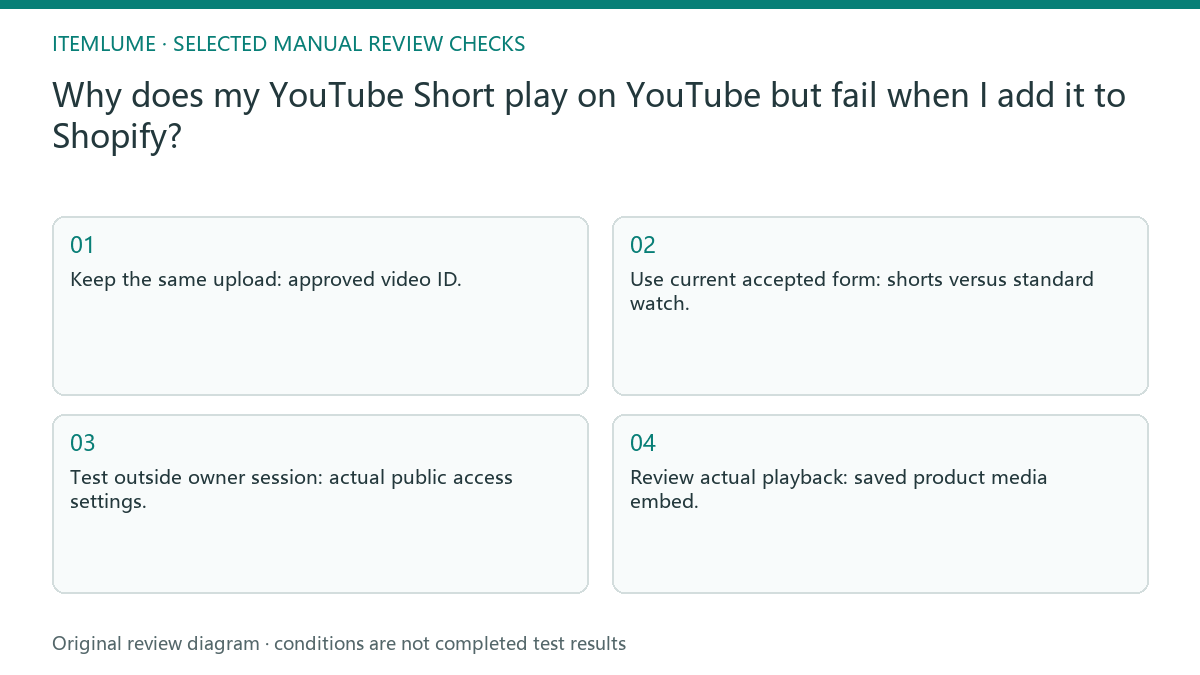
- Keep the same upload: approved video ID.
- Use current accepted form: shorts versus standard watch.
- Test outside owner session: actual public access settings.
- Review actual playback: saved product media embed.
Check a fictional public video’s normal watch URL
Fictional exercise: a seller’s mug clip plays on its YouTube Shorts page but fails when pasted into Shopify. The operator preserves its video ID, uses the standard watch address and checks access settings. Success is judged in the actual product player, not by another successful YouTube preview.
The fictional short product clip already plays on its host, yet the Shorts address fails in the product editor. The operator tests the documented address route without regenerating the film. A failed private or restricted video remains an access problem even if the address shape is corrected.
Separate address failure from creative quality
Stop if playback requires the uploader’s login or remains restricted for the intended embed. Resolve publishing permissions or choose an approved direct-upload route.
Keep the source video, access decision and successful destination together. Itemlume’s output is a file candidate; external hosting and Shopify embedding still need their own review. The seller manages YouTube publication and Shopify embedding. Downloading an Itemlume clip does not automatically upload it to either service or establish its public permissions.
Video identity to destination player: decision worksheet
| Check | Evidence to record | Review action |
|---|---|---|
| Video identity | Approved video ID | Keep the same upload |
| Address form | Shorts versus standard watch | Use current accepted form |
| Visibility | Actual public access settings | Test outside owner session |
| Destination player | Saved product media embed | Review actual playback |
Use this matrix as a manual review record and add your own real evidence. Its conditions are not completed test results.
Sources and further reading
Sources for this page were checked on . Platform rules can change; verify the current source before publishing. Prompt examples and workflow recommendations are Itemlume editorial guidance, not independently measured results.
Frequently asked questions
Should I regenerate a video rejected by its URL?
No. First diagnose the address route and host access separately from video quality.
Can a private video be fixed by changing URL shape?
No. The video’s access and embedding settings also need verification.
Has this exercise uploaded my video?
No. It describes a manual host-and-store handoff, with no account operation performed.
BUILD FROM A PRODUCT YOU KNOW
Put this workflow into practice with your own product.
Explore the relevant tool first. AI copy and concept planning are free after sign-in. Image and video generation require available credits and the applicable account access.
Open Product videos Check pricing and credits