 Itemlume
Product images / PUBLISHING WORKFLOW
Why does the same selected product show different details on my phone and laptop?
Compare the image the browser selected with the product variant shown on the page. A phone and laptop may request different files even when the main image setting looks identical. Both files can be sharp yet disagree about color, included parts or packaging. Fix the source-to-product mapping before increasing resolution.
Separate identity from image quality
Begin with the exact variant and gallery view, not just the product URL. Record the visible option name, thumbnail choice and a distinctive approved landmark. A missing lid or different strap is an identity mismatch; soft lettering is a separate rendition-quality issue. Take comparison screenshots under the same selected product state.
MDN documents currentSrc as the source selected by the browser, including a srcset choice. It does not prove a successful download. Ask the maintainer to inspect the selected source and whether it actually loaded before attributing the difference to responsive selection.
Build a source-state comparison
In this fictional example, a charcoal lunch container is selected on both devices. The laptop shows the approved charcoal body with its matching lid. The phone’s sharp narrow-layout image shows the earlier blue version. The seller’s main upload is correct, but a separate mobile source still points to a retired asset.
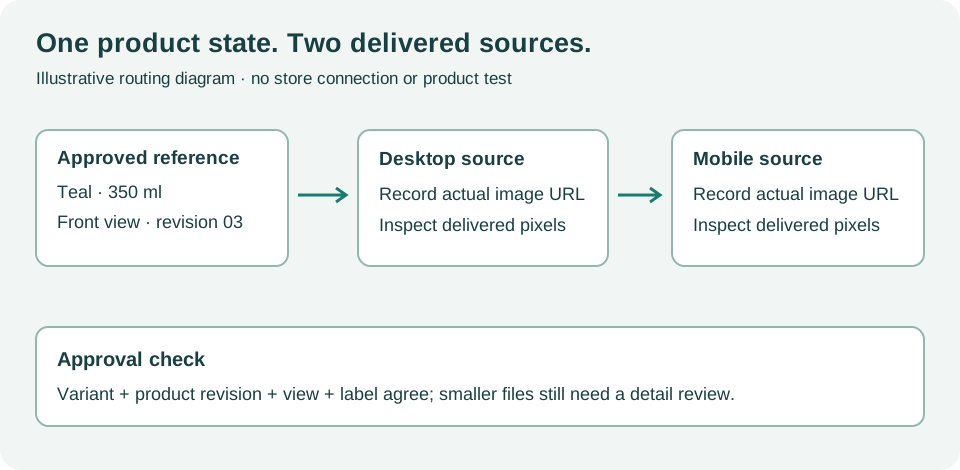 This illustrative state-routing diagram explains the inspection path; it is not an actual product result or a measurement from your store.
Hand over the smallest conflicting pair
Send the theme owner the selected variant, gallery view, desktop source, phone source and approved asset version. They should inspect the relevant picture, srcset or application mapping and correct the conflicting reference. Avoid replacing unrelated images or removing responsive delivery everywhere; the defect is the association between this state and this source.
If the sources intentionally use different crops, confirm that both still describe the same merchandise. A crop may change composition, but it must not silently substitute another lid, color or bundle. Review language and market-specific mappings separately when those also affect media.
Approve every affected route
Repeat the same state at the relevant widths, then switch away and back to the variant. Check initial arrival and subsequent selection; a corrected first image can still be overwritten by older variant-update logic. Record the observed loaded source and product landmark rather than declaring success from a settings screenshot.
Use the gallery interaction review as a manual review record. Sample rows are fictional. It does not connect to, import into or modify an external store or production machine.
Itemlume can help create and review product-consistent assets. It does not inspect your live currentSrc values or update external responsive mappings. The store maintainer must deploy and verify that repair.
Sources and further reading
Sources for this page were checked on . Platform rules can change; verify the current source before publishing. Prompt examples and workflow recommendations are Itemlume editorial guidance, not independently measured results.
Frequently asked questions
Will a larger file fix the wrong lid?
No. Correct product identity and source association before investigating sharpness.
Is the src attribute enough evidence?
Not always. Ask which responsive source the browser selected and whether it loaded.
Must desktop and phone use identical crops?
No, but approved crops must retain the same merchandise and selected variant.
BUILD FROM A PRODUCT YOU KNOW
Put this workflow into practice with your own product.
Explore the relevant tool first. AI copy and concept planning are free after sign-in. Image and video generation require available credits and the applicable account access.
Open Product images Check pricing and credits