 Itemlume
Packaging studio / PUBLISHING WORKFLOW
Can I reuse the same box artwork when I switch packaging suppliers?
Equal assembled box dimensions do not establish that two suppliers use the same flat structure. Confirm the receiving template and artwork revision as a pair.
Identify the drawing behind the artwork
A fictional seller, Cedar Cup, moves a carton order from Supplier A to Supplier B. Both quotes describe a similarly sized box, so the seller is tempted to resend last season’s artwork. First ask B for the current production drawing, its identifier and revision, the intended stock and the measurement convention. Ask whether the existing drawing can actually be used for this order.
Pacdora’s dieline workflow treats structure, dimensions, material and thickness as inputs. That supports asking about more than outside size. The supplier-revision record proposed here is our editorial handoff method, not a claim that Pacdora or Itemlume approves your new manufacturer’s tooling.
Map changes before placing the artwork
Have the production designer compare A’s old drawing with B’s confirmed template at the correct units and scale. Identify print faces, folds, cuts, closure and glue areas using the receiving supplier’s definitions. A matching front panel does not establish that the back, side or closure has stayed identical. Keep template marks distinct from artwork.
| Record | Why it matters |
|---|---|
| Supplier and drawing identifier | Names the structure actually being ordered |
| Structural revision | Distinguishes old and current geometry |
| Artwork revision | Identifies the approved copy and graphics |
| Approved proof pair | Connects visible approval to both files |
For Cedar Cup, a moved fold triggers an artwork-placement review even when the outer dimensions remain unchanged.
Assign one release owner and one current file pair
Agree who can authorize the drawing-and-artwork pair for production. Keep exploratory exports in a clearly separate location from released files. Record who supplied the template, who adapted the artwork and who confirmed the latest proof. Ask what permissions apply if the old supplier’s drawing or tooling is being transferred; possession of a file does not answer that contractual question.
If B revises the structure, mark the previous pair as superseded and ask for an updated proof. Do not leave two files named “final” in the same handoff. A dated approval email should identify the specific revisions instead of merely saying the box looks good.
Check the new supplier’s proof before release
For the proposed Cedar Cup order, compare the updated proof with the approved wording and panel map, then obtain the job’s required physical sample. Record which drawing and artwork produced it. If the sample reveals a placement issue, update the release pair rather than editing a detached preview and assuming the production source will follow.
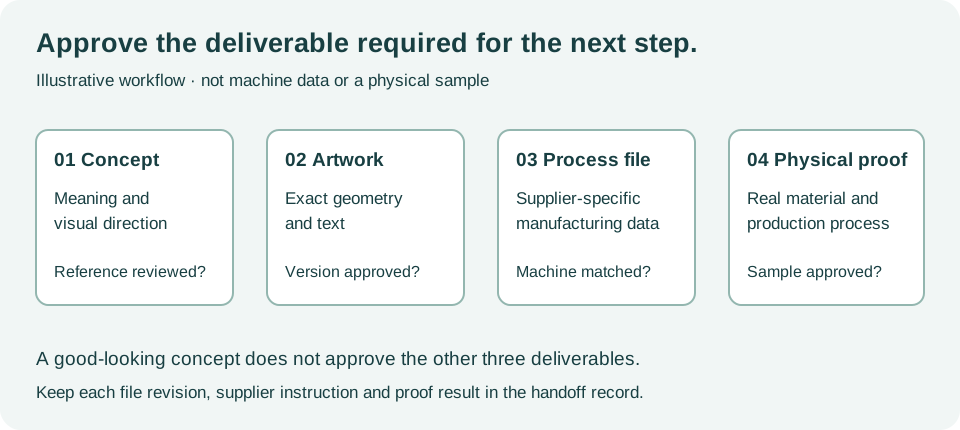
This original diagram describes stages, not a supplier-approved dieline.
Itemlume’s concept layouts help discuss the design. They do not establish manufacturing revisions, tooling rights or production authorization.
Use the production artwork handoff worksheet as a manual review record. Sample rows are fictional. It does not connect to, import into or modify an external store or production machine.
Sources and further reading
Sources for this page were checked on . Platform rules can change; verify the current source before publishing. Prompt examples and workflow recommendations are Itemlume editorial guidance, not independently measured results.
Frequently asked questions
Are equal outside dimensions enough to reuse artwork unchanged?
No. Have the receiving supplier confirm the actual template and have a designer review the complete panel layout.
Who should own final release approval?
Agree a named release owner for your project and identify the drawing-and-artwork pair in the approval record.
Can an Itemlume concept SVG replace the new supplier’s drawing?
No. The receiving supplier must confirm the production structure and artwork requirements.
BUILD FROM A PRODUCT YOU KNOW
Put this workflow into practice with your own product.
Explore the relevant tool first. AI copy and concept planning are free after sign-in. Image and video generation require available credits and the applicable account access.
Open Packaging studio Check pricing and credits